

//
Posts tagged "tape saturation"
Universal Audio now has a plugin version of the Studer A800 tape machine. With a selection of controls to tweak – from tape speed and tape formula to calibration type, hiss, and hum – you can ‘hit the tape’ as hard as you like, and fine-tune the tone. While it’s a multichannel plugin, the handy ‘gang’ control adjusts any parameter globally, which is nice if you’re running it on every track. The A800 is considered one of the best 2″ recorders ever made, known for its warmth, clarity, and great low-end impact… some people say you can’t beat the real thing, but consider that the plugin version weighs 900lbs less. Sonic Scoop has more: “…the A800 plug-in is a first of its kind product, modeled by UA’s DSP engineers with help from AES magnetic recording expert Jay McKnight over a 12-month period. The plug-in models the entire tape path and circuit electronics of the classic hardware, plus the sounds of four distinct tape formulas.” Link to read the rest of the article on SonicScoop.com. –Mike Bauer... Click on the title for more
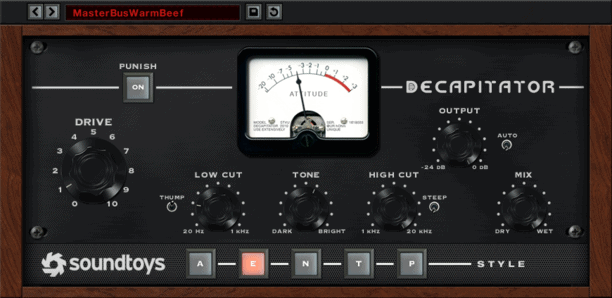
Working with audio ‘in the box’ provides little room for pushing past the boundaries of your device. Once you reach the upper limit of your digital gear, there’s no going any further. However, when you overdrive analog gear, the result can be very different – tube saturation, pleasing even-order harmonics, warmth and character. SoundToys aims to bring a little bit of analog gear saturation to the digital realm with Decapitator ($179.99 Native). The folks at SoundToys chose five pieces of classic analog recording gear, and modeled how they reacted as they were pushed to the point of saturation and then well beyond their normal limits. This resulted in five unique saturation algorithms, which are represented on the decapitator by the ‘Style’ buttons (labeled A, E, N, T, P). These choices include an Ampex 350 tape drive preamp, a Chandler/EMI TG channel strip, a Neve 1057 input channel, and a Culture Vulture distortion device (with either the triode or pentode tube setting). The Drive control will increase the amount of gain and distortion of your signal, ranging from subtle to over-the-top. While there is also an Output control, turning on the Auto Output switch will decrease the output level as you […]... Click on the title for more